Create a new file group
The Create New File Group utility automatically creates a new file group by copying specified tables and saving the drivers. When you create a new file group, the system automatically changes the FP_NextYear file group alias.
To create a new file group:
-
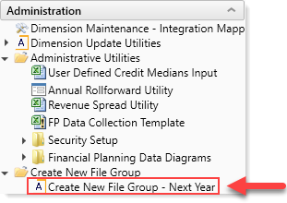
In the Fin Plan Admin task pane, in the Administration section, click Create New File Group, and double-click Create New File Group - Next Year.
- In the New File Group Year field, type the year to assign the new file group, and click Next.
- In the General Properties dialog, click Finish.
-
The system displays a warning prompt that lists the tables it will not create as part of the new file group. To continue, click OK.

-
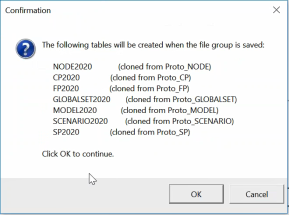
The system then displays a list of the tables it will create as part of the new file group. To continue, click OK.
- The system displays a confirmation prompt that the file group saved successfully. Click OK.
-
In the Edit File Group dialog, to continue creating the file group, click OK.
IMPORTANT: If you click Cancel, the system will not create the file group.
- Close and then re-open the Fin Plan Admin task pane.
